Since my last post I've been thinking a lot about what to include in this post and I feel that I've perhaps thought about it too much. I guess that's why it's taken so long for me to sit down and actually create a new post. I'm quite new at this type of blog so tonight I decided to just type something and see how it works out. As soon as I started to type it struck me that this is exactly how a beginner should approach most things and now it seems obvious to me that this is especially true for digital photography. Thinking back to my first post I suggested just setting the camera to automatic and then go and take some photos. After all it's not costing anything and when you review your images you can just delete the ones that you don't like.
Back to the title of this post, what do you want to include in your photos. Well I guess the first thing is to find yourself a subject or subjects, and that can be absolutely anything you want. Then you might want to think about how you are going to frame your photo to include the subject. Do you want the whole of the subject or just a part of the subject? Do you want to show the subject in it's environment or do you want to keep it in isolation? Which aspect and what angle do you want to use to look at the subject? Where in the image do you want the subject to be? What I'm talking about is photo composition.
Now composition is a big subject and there are lots of books written that cover this subject in vast detail but for a beginner photographer I think this would be far too daunting. There are a load of so called rules of composition which I think should really be termed suggestions, but this is just my opinion. There are certainly a few things that should perhaps be avoided but then again you may want to use them on purpose. In the end I believe you should compose your images as you like them, but more importantly try lots of different layouts, angles. When you review them pick your favourites and then try to decide why you prefer one shot over another. In this way you can take more photos that you like and probably that other people will like too.
So what things do I think you should try to avoid? Well firstly if you are trying to include the whole subject, make sure you do. Having odd bits missing can make things look odd. Of course if that is what you are trying to achieve then chop bits off where you like. Try to avoid things in the background from detracting from your subject. Things like trees coming out of the top of your subject's head or perhaps areas of strong colour or bright lights. Try and keep horizons horizontal and vertical lines vertical, or make sure the viewer can tell that the frame is tilted on purpose.
Some suggestions to improve your composition. Place your subject off centre with more space on the side where the subject is facing so the subject has a space to move towards. Even if the subject is not facing in a particular direction they often look better away from the centre but there are always exceptions so you decide. This is often called the rule of thirds and it applies to up and down as well as left and right. In landscape photography photos where the horizon or some other horizontal feature is very close to the centre can be improved by moving the line either up or down in the frame.
If you have more than one subject, try to have an odd number as quite often pairs of subjects can feel odd. I'd try this one out and see what you think. I think that as the number of subjects rises that the difference between odd and even numbers becomes less noticeable.
Try to include colours that go together. There's loads of information about colour theory but I think a lot of it is personal taste. I like blue and yellow, or green and red, or blue and red etc. Perhaps the thing is to try to not include too many colours, especially in large areas. Quite often three main colours is more than enough in an image.
Look for repetition of shapes in the scene. This could be either lots of the same thing or different things that have a similar shape. Maybe there's lots of lines or circles or squares or maybe even just bits of similar curves or angles. Having the repeating patterns can help help to pull an image together
I think the most important suggestion I've been given is to get closer to your subject. Make sure that anyone else looking at your photos is sure which is the main subject. Perhaps get so close that you can't include the whole of the subject up to the point where you are abstracting the main subject. It might not always be possible to get closer to your subject but if you can it's always worth trying it and see how it turns out.
Here's a composition example that I took on Sunday. I've positioned the tree off centre and I think it is obvious that this is the main subject of the photo. There are just three main colours in the photo, the blue sky, the orangey yellow leaves and the green grass. The shape of the clouds, particularly the one near the top left are mimicking the shape made by the leaves on the tree. The trees in the background are also repeating the tree shape as is the shadow of the tree itself. The horizon is very close to the third of the way up the picture and I think it's level.
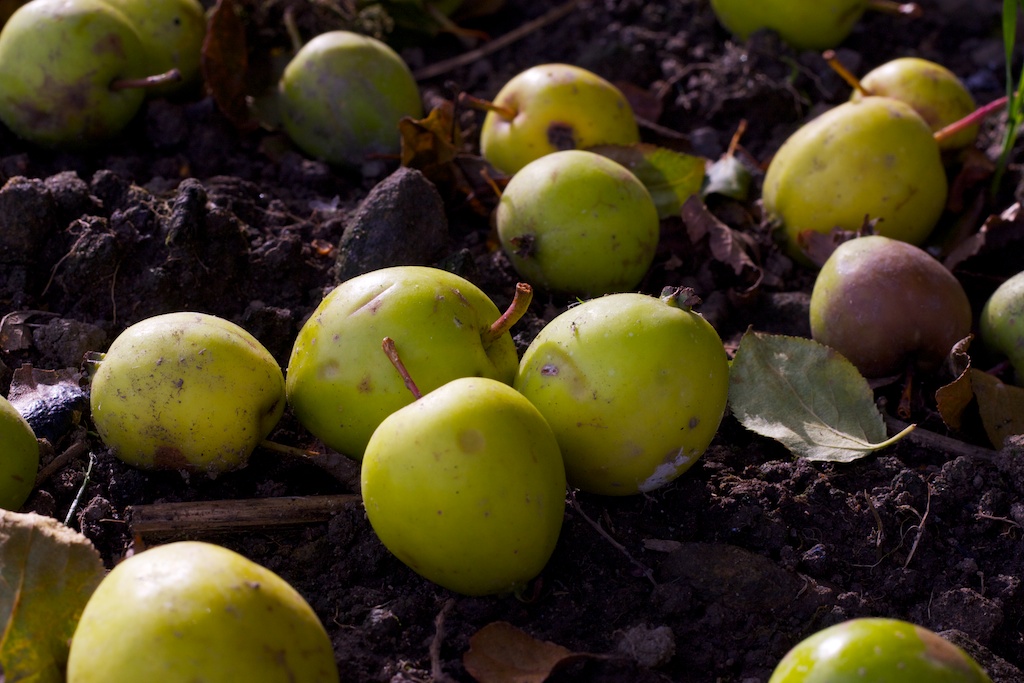
Another photo from Sunday which was taken under a tree where there was hundreds of fallen crab apples. I took lots of photos from different angles and included different numbers of apples in the shots. I picked this one because I got in very close, this was as near as my lens could focus. It's using the idea of repetition of the round shapes and even the odd leaf if almost round. Again there are few colours, effectively with the soil so dark there's really just yellow and bits of red. Perhaps there's no single main subject but I think the repetition makes up for that. Let me know what you think.
OK, I think I've waffled on enough about composition for now. I will very likely have a another post much later with a bit more about composition and I'm sure I will mention composition when covering other subjects. Next time I think I'll start to tackle the subject of picture types and how they differ in the way the camera decides on its setting.
A Place for New Photographers and Those Wanting to Learn the Basics
I bought my first and only DSLR in September 2007 and have been a very keen enthusiast ever since. I usually go out walking and taking photographs at least once a week and try to post regularly on my blog 'Let Me Show You What I See'. I feel that I need a new project so I decided to start this new blog to pass on what I have learnt in the last three years to anyone just starting out in photography or wanting to know a bit more about how to use their photography equipment. I still consider myself to be little more than a practiced beginner so it's going to be at a fairly basic level but hopefully understandable to anyone who is starting out with thir first camera or struggling with their equipment or technique.
I have been contemplating what strategy to follow with the order of topics to cover because I'm wanting to keep each post quite short and gradually build up into a useful resource. In the end I decided to start with a post about taking your first photos and then see where the subsequent posts take me. I will number the posts based on the order I first write then and I might go back and update them with extra information or links to other posts as I progress through the subject matter. I will try to make the content generic so the make and model of you camera isn't relevant and hopefully useful for either DSLR, compact or point and shoot cameras.
If anyone has any specific questions they would like me to answer, please send me an email or put the questions in a comment. I can't guarantee the accuracy of the answers I provide or anything else I post as I only know what I know. I may express opinions with which people may disagree but they are just my opinions and I am happy for people to disagree. I am hoping to learn from this blog myself as I expect to have a need to read things from my camera manual and search for information on the internet as I cover subjects. I am also hoping that the experience will improve my own photography technique as I produce images for inclusion in the blog to illustrate the specific subject.
I have been contemplating what strategy to follow with the order of topics to cover because I'm wanting to keep each post quite short and gradually build up into a useful resource. In the end I decided to start with a post about taking your first photos and then see where the subsequent posts take me. I will number the posts based on the order I first write then and I might go back and update them with extra information or links to other posts as I progress through the subject matter. I will try to make the content generic so the make and model of you camera isn't relevant and hopefully useful for either DSLR, compact or point and shoot cameras.
If anyone has any specific questions they would like me to answer, please send me an email or put the questions in a comment. I can't guarantee the accuracy of the answers I provide or anything else I post as I only know what I know. I may express opinions with which people may disagree but they are just my opinions and I am happy for people to disagree. I am hoping to learn from this blog myself as I expect to have a need to read things from my camera manual and search for information on the internet as I cover subjects. I am also hoping that the experience will improve my own photography technique as I produce images for inclusion in the blog to illustrate the specific subject.
Thursday, 4 November 2010
Tuesday, 26 October 2010
002 - Thoughts on First Shots
In part 001 I talked about getting comfortable with your camera and the controls so you can concentrate on making your shots. I thought it might be useful to discuss this a bit further with a few hints and tips that I've picked up over the last few years.
First of all the camera needs to be held firmly so that it isn't moving randomly when the button is pressed. In most circumstances you should use both hands even with a small camera the exception is mainly if you're using the other hand to hang onto something for safety. If you're standing keep your elbows tight into your body, stand with your feet about a foot (30cm) apart and have one foot slightly in front of the other. If there is a solid object, such as a wall or a fence, you could try leaning against it to keep yourself steady. If your taking a photo over a small wall or a fence you could be steadier by resting your elbows or lower arms against the wall of fence. Sometimes you might find actually holding the camera on top of or against a wall, fence, vehicle etc. can give you a very steady platform for your camera. Finally, just as you're about to push the button, hold your breath.
If you're wanting to shoot from lower down try going down on one knee and use knee pads for comfort if you're on hard ground. To get even lower you could lay on the ground and prop yourself up on you're elbows. I always carry a rolled up black plastic dustbin liner with me to put over damp or dirty ground when I'm out taking landscape photos or close ups of plants and flowers.
Ideally to eliminate the problem of shakes the camera should be attached to a good quality tripod. But as a beginner photographer a suitable tripod is a large and barely justifiable expense and a cheap tripod is generally a waste of money. I will include the use of tripods in a much later post because I think it might be something that you'd want to use as you gain experience.
To get used to where the controls are on your camera you need to practice, practice, practice. In the beginning while you're using automatic mode the only controls you need to know are the shutter button and zoom. Most shutter buttons are near your index finger on the right hand is normally placed when holding the camera properly. On a small camera the button is normally a single press which starts of the process for the camera to capture an image. On bigger cameras and DSLRs there is usually a half-press where the camera gets itself ready and will display its settings on the display. If the settings are acceptable then completely pressing the button takes the shot.
On a small camera the zoom may be controlled by a rocker button or two individual buttons on the rear of the camera. On a DSLR the zoom is normally controlled by a ring on the lens itself. Assuming the lens does zoom then there will normally be two rings on the lens, one for zoom and the other for focus. It's quite useful to get to know which ring is which so you can easily adjust the zoom as you're taking photos. If the camera is set to auto focus some lenses will not allow you to move the focus ring if the shutter button has been half-pressed.
Next time some more thoughts about what to photograph, what to include in the image and where to place elements within the frame.
First of all the camera needs to be held firmly so that it isn't moving randomly when the button is pressed. In most circumstances you should use both hands even with a small camera the exception is mainly if you're using the other hand to hang onto something for safety. If you're standing keep your elbows tight into your body, stand with your feet about a foot (30cm) apart and have one foot slightly in front of the other. If there is a solid object, such as a wall or a fence, you could try leaning against it to keep yourself steady. If your taking a photo over a small wall or a fence you could be steadier by resting your elbows or lower arms against the wall of fence. Sometimes you might find actually holding the camera on top of or against a wall, fence, vehicle etc. can give you a very steady platform for your camera. Finally, just as you're about to push the button, hold your breath.
If you're wanting to shoot from lower down try going down on one knee and use knee pads for comfort if you're on hard ground. To get even lower you could lay on the ground and prop yourself up on you're elbows. I always carry a rolled up black plastic dustbin liner with me to put over damp or dirty ground when I'm out taking landscape photos or close ups of plants and flowers.
Ideally to eliminate the problem of shakes the camera should be attached to a good quality tripod. But as a beginner photographer a suitable tripod is a large and barely justifiable expense and a cheap tripod is generally a waste of money. I will include the use of tripods in a much later post because I think it might be something that you'd want to use as you gain experience.
To get used to where the controls are on your camera you need to practice, practice, practice. In the beginning while you're using automatic mode the only controls you need to know are the shutter button and zoom. Most shutter buttons are near your index finger on the right hand is normally placed when holding the camera properly. On a small camera the button is normally a single press which starts of the process for the camera to capture an image. On bigger cameras and DSLRs there is usually a half-press where the camera gets itself ready and will display its settings on the display. If the settings are acceptable then completely pressing the button takes the shot.
On a small camera the zoom may be controlled by a rocker button or two individual buttons on the rear of the camera. On a DSLR the zoom is normally controlled by a ring on the lens itself. Assuming the lens does zoom then there will normally be two rings on the lens, one for zoom and the other for focus. It's quite useful to get to know which ring is which so you can easily adjust the zoom as you're taking photos. If the camera is set to auto focus some lenses will not allow you to move the focus ring if the shutter button has been half-pressed.
Next time some more thoughts about what to photograph, what to include in the image and where to place elements within the frame.
Friday, 22 October 2010
001- Your First Photos
So where to begin? When you first unpack your new camera it's exciting but it's also very confusing. Lots of buttons, dials, menus and lots of technical terms that mean nothing to you. That is certainly how I felt when I got my first DSLR three years ago. What does Digital Single Lens Reflex mean, F stops, ISO, white balance? I've read the manual but I've still no idea where to set all these control to take my first photos. Then comes the realisation that I've spent several hundred pounds on a fancy looking piece of metal, plastic and glass.
However there's no need to worry, today's cameras are amazing, they are highly sophisticated and very capable of making your decisions for you. If you are completely new to photography the camera is in a much better position than you are to determine the settings you need to get a decent image in most circumstances. If you have some previous experience with photography you may know about some of the settings but others may still be bewildering.
I know that it goes completely against all the advice that I was ever given but what you need to do is set everything to automatic and accept the settings that the camera makes for you. Then get up and find something to photograph, something interesting, something you find beautiful or even something horrible. I can assure you the camera will make better decisions than you will until you get to understand what you are trying to do and how to achieve your aims. You may need to look in your manual to see how to set everything to automatic and don't forget to check that if you are using a DSLR to set the lens to auto-focus too.
By setting everything to automatic that means you can concentrate on capturing the image that you are after and getting to feel comfortable with holding the camera and pressing the shutter button. You need to be able to hold the camera steady and be gentle when pressing the shutter button to avoid getting blurred images. You need to know where the shutter button is and be able to zoom in and out without taking your eye away from the eyepiece or view-screen to look around the camera (I am assuming here that your camera came with a zoom lens or a zoom control).
By default the camera will generally focus on the nearest object it can find using the focus points and will attempt to keep in focus anything else it can see. The camera will also attempt to maximise the quality of the image taken including making the shutter speed sufficiently fast for the scene being capture. Modern cameras will attempt to identify the image type you are taken and then use a database of image types to optimise the settings for the image type. The camera is very dependent on the amount of light available so if there is little light it may struggle to attain the optimal settings but it will try its best.
As a quick example I've set my camera to fully automatic and tried out my camera in a very poorly lit room. It automatically popped up the camera flash and made all the setting to be able to get this shot. The image is straight out of the camera with no post processing whatsoever and I'm quite happy with how it has turned out.
In the next post I will put forward a few more thoughts about using the camera in fully automatic mode, then on subsequent posts I'll move onto using picture styles
However there's no need to worry, today's cameras are amazing, they are highly sophisticated and very capable of making your decisions for you. If you are completely new to photography the camera is in a much better position than you are to determine the settings you need to get a decent image in most circumstances. If you have some previous experience with photography you may know about some of the settings but others may still be bewildering.
I know that it goes completely against all the advice that I was ever given but what you need to do is set everything to automatic and accept the settings that the camera makes for you. Then get up and find something to photograph, something interesting, something you find beautiful or even something horrible. I can assure you the camera will make better decisions than you will until you get to understand what you are trying to do and how to achieve your aims. You may need to look in your manual to see how to set everything to automatic and don't forget to check that if you are using a DSLR to set the lens to auto-focus too.
By setting everything to automatic that means you can concentrate on capturing the image that you are after and getting to feel comfortable with holding the camera and pressing the shutter button. You need to be able to hold the camera steady and be gentle when pressing the shutter button to avoid getting blurred images. You need to know where the shutter button is and be able to zoom in and out without taking your eye away from the eyepiece or view-screen to look around the camera (I am assuming here that your camera came with a zoom lens or a zoom control).
By default the camera will generally focus on the nearest object it can find using the focus points and will attempt to keep in focus anything else it can see. The camera will also attempt to maximise the quality of the image taken including making the shutter speed sufficiently fast for the scene being capture. Modern cameras will attempt to identify the image type you are taken and then use a database of image types to optimise the settings for the image type. The camera is very dependent on the amount of light available so if there is little light it may struggle to attain the optimal settings but it will try its best.
As a quick example I've set my camera to fully automatic and tried out my camera in a very poorly lit room. It automatically popped up the camera flash and made all the setting to be able to get this shot. The image is straight out of the camera with no post processing whatsoever and I'm quite happy with how it has turned out.
In the next post I will put forward a few more thoughts about using the camera in fully automatic mode, then on subsequent posts I'll move onto using picture styles
Subscribe to:
Posts (Atom)

